

x402 on Algorand
x402 is an open payment protocol that lets services charge for API access directly over HTTP. Clients pay per request using the 402 Payment Required status code — no sessions, API keys, or credential management required.
The protocol has three participants: a client sends a request, a resource server returns payment requirements (or the response if already paid), and a facilitator verifies and settles payments on-chain.
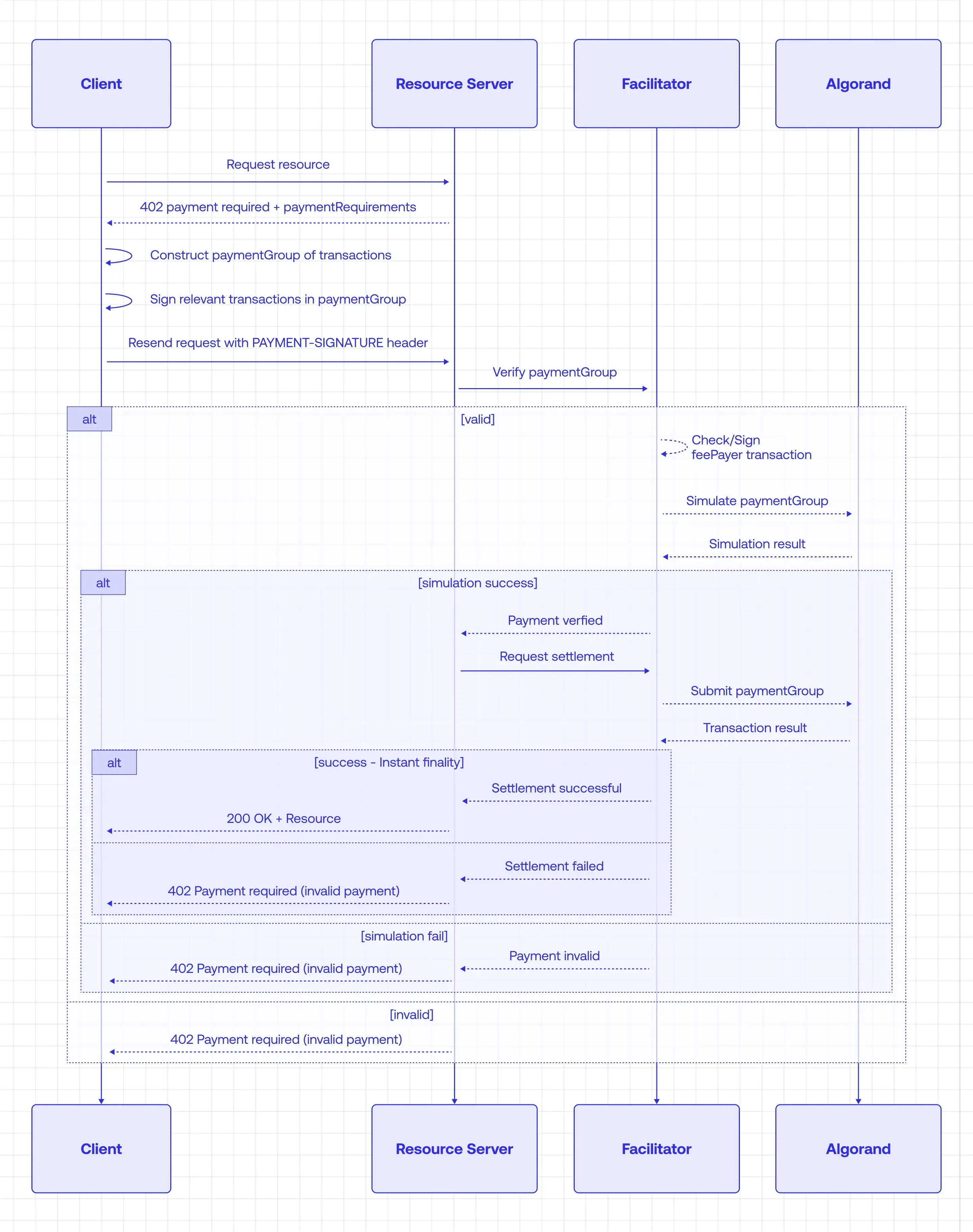
This tutorial walks through the protocol by building a working example on Algorand TestNet. You will build a pay-per-API /weather endpoint. Unpaid requests get 402 Payment Required; paid requests get JSON back. You will:
- Build a client that automatically pays when it receives a 402 response
- Build a resource server that charges for
GET /weather - Run both locally end-to-end
Build a pay-per-API service with x402
Section titled “Build a pay-per-API service with x402”Prerequisites
Section titled “Prerequisites”- Node.js (LTS or newer) with npm
Complete these steps in order before running code:
-
Create two TestNet accounts: one for the client (the payer) and one for the resource server (the receiver).
-
Fund both accounts with TestNet ALGO using the Lora faucet. See fees and minimum balance.
-
Opt both accounts into TestNet USDC through Lora or your wallet. See opt in to assets.
-
Get USDC on both accounts from the Circle testnet faucet. Select Algorand Testnet and fund each address.
-
Save these values for later: the client’s payer mnemonic (used as
AVM_MNEMONIC) and the resource server’s public address (used asAVM_ADDRESS).
Part 1: Build the client
Section titled “Part 1: Build the client”In this part you’ll build a client that sends a request, handles the 402 response, signs and submits payment, then retries with proof of payment. You’ll test it against a hosted resource server before building your own in Part 2.
Create the project
Section titled “Create the project”mkdir x402-demo-clientcd x402-demo-clientnpm init -yAdd TypeScript tooling
Section titled “Add TypeScript tooling”npm install -D typescript @types/node tsxInstall dependencies
Section titled “Install dependencies”npm install @x402-avm/fetch@^2.6.1 @x402-avm/avm@^2.6.1 @algorandfoundation/[email protected] dotenvClient config
Section titled “Client config”The x402 packages use ESM imports, so package.json needs "type": "module". Open the generated package.json and add it:
{ "name": "x402-demo-client", "type": "module"}Only "type": "module" matters — leave the rest of the generated fields as-is.
Create tsconfig.json in the project root:
{ "compilerOptions": { "target": "ES2022", "module": "NodeNext", "moduleResolution": "NodeNext", "strict": true, "skipLibCheck": true, "esModuleInterop": true, "types": ["node"] }, "include": ["**/*.ts"]}Environment variables
Section titled “Environment variables”Add .env to .gitignore, then create .env:
AVM_MNEMONIC="your 25-word mnemonic here"Plain fetch first (expect 402)
Section titled “Plain fetch first (expect 402)”Before adding the x402 libraries, confirm the endpoint requires payment. A plain fetch should return HTTP 402.
Create index.ts at the project root:
const url = 'https://x402.goplausible.xyz/examples/weather';
async function main(): Promise<void> {  const response = await fetch(url, { method: 'GET' });  console.log('status:', response.status, response.statusText);  const paymentHeader = response.headers.get('payment-required');  if (paymentHeader) {    console.log('payment-required (first 80 chars):', paymentHeader.slice(0, 80) + '...');  }}
main().catch(console.error);
Run:
npx tsx index.tsExpected output (your payment-required value will differ):
status: 402 Payment Requiredpayment-required (first 80 chars): eyJhbGciOiJIUzI1NiIsInR5cCI6IkpXVCJ9.eyJzY2hlbWUiOiJleGFjd...Add x402 payment support
Section titled “Add x402 payment support”Now replace index.ts with the paying version. Instead of a plain fetch, wrapFetchWithPayment intercepts 402 responses, signs an Algorand payment using the mnemonic from AVM_MNEMONIC, and retries the request with the payment proof attached. This requires the Setup above: funded accounts, asset opt-in, and TestNet USDC.
import { config } from 'dotenv';import { x402Client, wrapFetchWithPayment, x402HTTPClient } from '@x402-avm/fetch';import { toClientAvmSigner } from '@x402-avm/avm';import { registerExactAvmScheme } from '@x402-avm/avm/exact/client';import {  ed25519SigningKeyFromWrappedSecret,  type WrappedEd25519Seed,} from '@algorandfoundation/algokit-utils/crypto';import { seedFromMnemonic } from '@algorandfoundation/algokit-utils/algo25';
config();
const avmMnemonic = process.env.AVM_MNEMONIC as string;const url = 'https://x402.goplausible.xyz/examples/weather';
async function main(): Promise<void> {  const secretKey = await getSecretKeyFromMnemonic(avmMnemonic);  // Create the Algorand signer used to authorize payments.  const avmSigner = toClientAvmSigner(secretKey);
  // Initialize the x402 client.  const client = new x402Client();  // Register the exact AVM scheme so the client knows how to satisfy Algorand "exact" requirements.  registerExactAvmScheme(client, { signer: avmSigner });  console.info(`AVM signer: ${avmSigner.address}`);
  // Wrap fetch so 402 responses trigger payment handling automatically.  const fetchWithPayment = wrapFetchWithPayment(fetch, client);
  const response = await fetchWithPayment(url, { method: 'GET' });
  if (response.ok) {    const paymentResponse = new x402HTTPClient(client).getPaymentSettleResponse(name =>      response.headers.get(name),    );    console.log('\nPayment response:', JSON.stringify(paymentResponse, null, 2));  } else {    console.log(`\nNo payment settled (response status: ${response.status})`);  }}
// Build the base64-encoded signing key that x402-avm expects.// The format is the 32-byte Ed25519 seed concatenated with the 32-byte public key.async function getSecretKeyFromMnemonic(avmMnemonic: string): Promise<string> {  const seed = seedFromMnemonic(avmMnemonic);  const seedCopy = new Uint8Array(seed);  const wrappedSeed: WrappedEd25519Seed = {    unwrapEd25519Seed: async () => seed,    wrapEd25519Seed: async () => {},  };  const wrappedSecret = await ed25519SigningKeyFromWrappedSecret(wrappedSeed);  return Buffer.concat([Buffer.from(seedCopy), Buffer.from(wrappedSecret.ed25519Pubkey)]).toString(    'base64',  );}
main().catch(error => {  console.error(error?.response?.data?.error ?? error);  process.exit(1);});
Run the paying client from the project root:
npx tsx index.tsExpected output (addresses and transaction IDs will differ):
AVM signer: ABC123...Payment response: { "transactionId": "TXID...", "status": "settled"}Part 2: Build the resource server
Section titled “Part 2: Build the resource server”In this part you’ll build a resource server that hosts a /weather endpoint. It returns a 402 response when a request lacks valid payment and delegates verification to the facilitator, only serving data once payment is confirmed.
Create the server project
Section titled “Create the server project”mkdir x402-demo-servercd x402-demo-servernpm init -yAdd TypeScript tooling
Section titled “Add TypeScript tooling”npm install -D typescript @types/node tsxInstall dependencies
Section titled “Install dependencies”npm install @x402-avm/hono@^2.6.1 @x402-avm/avm@^2.6.1 @x402-avm/core@^2.6.1 hono @hono/node-server dotenvServer config
Section titled “Server config”As with the client, set "type": "module" in package.json:
{ "name": "x402-demo-server", "type": "module"}Then copy tsconfig.json from Client config.
Environment variables
Section titled “Environment variables”Add .env to .gitignore, then create .env:
AVM_ADDRESS=FACILITATOR_URL=https://facilitator.goplausible.xyzUse the resource server account’s public address for AVM_ADDRESS (Setup). FACILITATOR_URL points to the hosted facilitator, so you do not need to run facilitator code for this tutorial.
Implement GET /weather
Section titled “Implement GET /weather”Create index.ts at the project root. The paymentMiddleware function intercepts incoming requests and checks for a valid payment proof before forwarding to your route handler — unpaid requests get a 402 response with payment instructions.
The accepts array defines what the server will accept as payment. Each entry specifies the scheme, price, network, and recipient. The network value algorand:SGO1GKSzyE7IEPItTxCByw9x8FmnrCDexi9/cOUJOiI= is the CAIP-2 identifier for Algorand TestNet — this tells clients which chain to submit payment on.
import { config } from 'dotenv';import { paymentMiddleware, x402ResourceServer } from '@x402-avm/hono';import { ExactAvmScheme } from '@x402-avm/avm/exact/server';import { HTTPFacilitatorClient } from '@x402-avm/core/server';import { Hono } from 'hono';import { serve } from '@hono/node-server';config();
const avmAddress = process.env.AVM_ADDRESS;if (!avmAddress) {  console.error('Missing AVM_ADDRESS environment variable');  process.exit(1);}
const facilitatorUrl = process.env.FACILITATOR_URL;if (!facilitatorUrl) {  console.error('Missing FACILITATOR_URL environment variable');  process.exit(1);}const facilitatorClient = new HTTPFacilitatorClient({ url: facilitatorUrl });
const accepts = [  {    scheme: 'exact',    price: '$0.001',    network: 'algorand:SGO1GKSzyE7IEPItTxCByw9x8FmnrCDexi9/cOUJOiI=' as const,    payTo: avmAddress,  },];
const server = new x402ResourceServer(facilitatorClient).register(  'algorand:SGO1GKSzyE7IEPItTxCByw9x8FmnrCDexi9/cOUJOiI=',  new ExactAvmScheme(),);
const app = new Hono();
app.use(  paymentMiddleware(    {      'GET /weather': {        accepts,        description: 'Weather data',        mimeType: 'application/json',      },    },    server,  ),);
app.get('/weather', c => {  return c.json({    report: {      weather: 'sunny',      temperature: 70,    },  });});
serve({  fetch: app.fetch,  port: 4021,});
console.log(`Server listening at http://localhost:4021`);
Unpaid GET /weather returns HTTP 402; paid requests return the JSON body.
Part 3: Run locally
Section titled “Part 3: Run locally”In Part 1 you hit a hosted resource server. Now you’ll point the client at your own local server so you can see the full flow end-to-end.
Start the resource server
Section titled “Start the resource server”From the x402-demo-server directory:
npx tsx index.tsLeave it running on http://localhost:4021.
Expected output:
Server listening at http://localhost:4021Point the client at your server
Section titled “Point the client at your server”In the client index.ts, change the URL to your local server:
const url = 'http://localhost:4021/weather';Run the client
Section titled “Run the client”From the x402-demo-client directory:
npx tsx index.tsYou should get the weather JSON after payment settles. The output will look similar to the Part 1 output, with your local server’s transaction details.
Next steps
Section titled “Next steps”You now have a working x402 payment flow on Algorand TestNet. From here you can add more paid routes, adjust pricing, or deploy your own facilitator for full control over payment settlement.